
macOS Guide
Proxy servers (macOS)
Add, edit, test and remove SOCKS5 and HTTP proxy servers in ProxyBridge for macOS. Authentication, the DNS (send hostname) option, the four-step proxy test, UDP support and running several proxies at once.
Proxy servers on macOS
A proxy server is where ProxyBridge sends the traffic that your rules select. ProxyBridge for macOS supports SOCKS5 and HTTP (CONNECT) proxies, with or without a user name and password. You can add as many as you like and let each rule use a different one.
Open the list with Proxy > Proxy Settings... (⌘,).
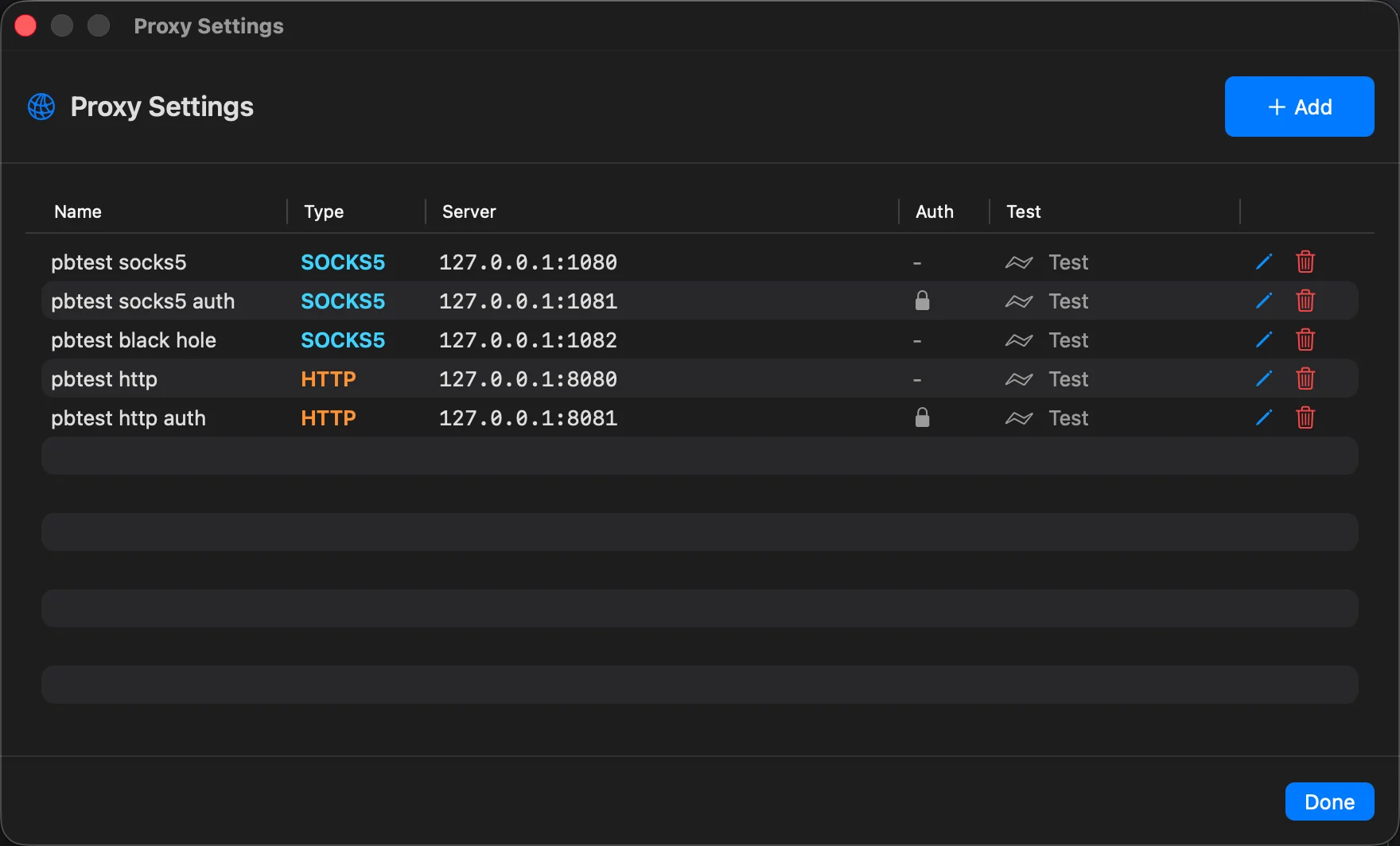
The Proxy Settings window
| Part | What it does |
|---|---|
| Add (top right) | Add a proxy |
| Name column | Your label for the proxy. Shows = when you left it empty |
| Type column | SOCKS5 or HTTP |
| Server column | host:port |
| Auth column | A lock icon when the proxy has a user name |
| Test | Check the proxy (see Test a proxy) |
| Pencil and trash icons | Edit or delete the proxy |
| Done | Close the window |
A proxy is saved the moment you press Save in its window, and the running ProxyBridge extension receives the new list at once. You do not need to restart anything.
With no proxies the window says No proxy servers configured. You can still use rules with the actions DIRECT and BLOCK without any proxy.
Add a proxy
Click Add.
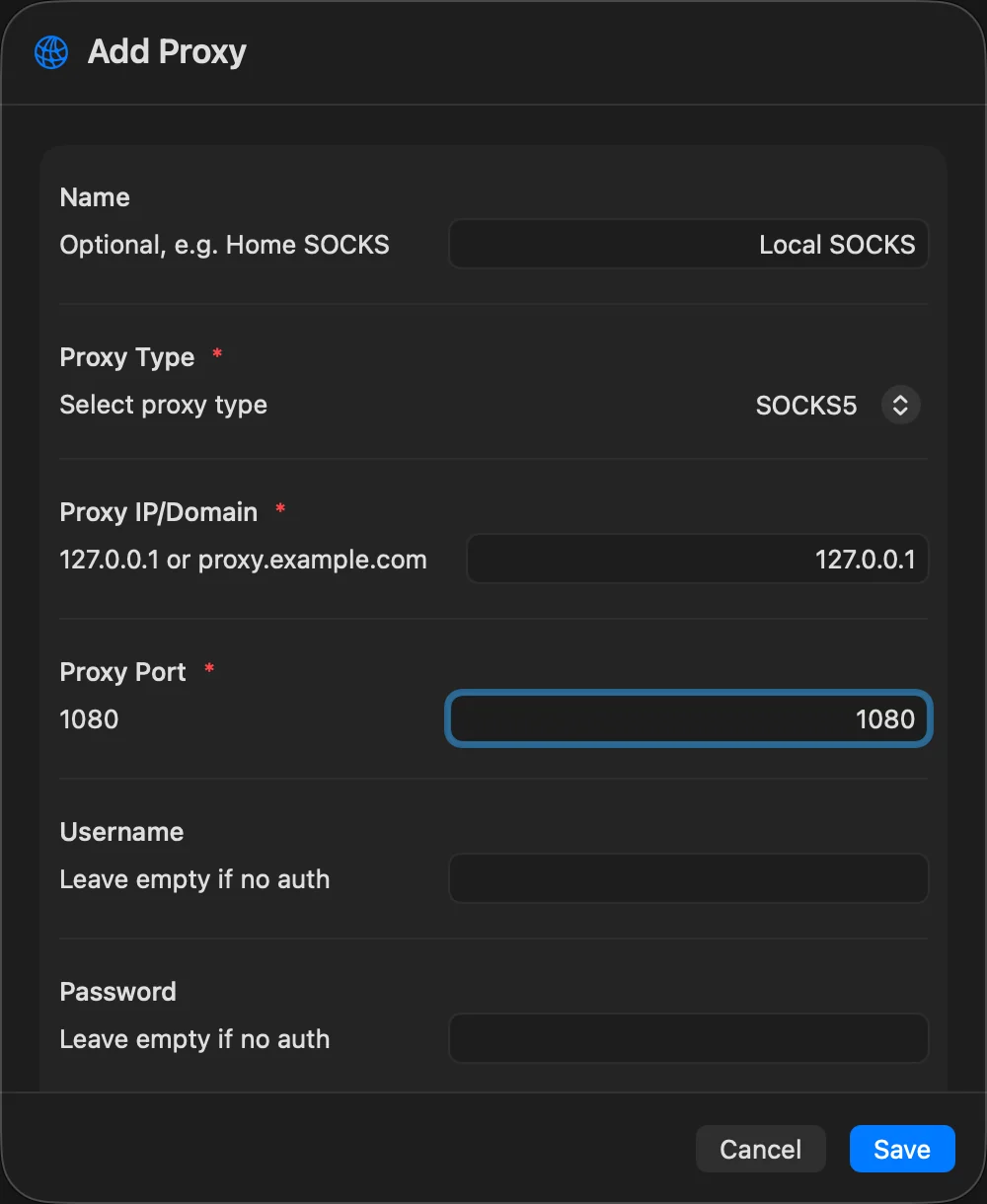
| Field | Meaning |
|---|---|
| Name | Optional label, for example Burp or Home SOCKS. It is what you pick in the rule's Action list, shown as Burp = HTTP 127.0.0.1:8080. Without a name the list shows HTTP 127.0.0.1:8080 |
| Proxy Type | SOCKS5 (the default choice) or HTTP |
| Proxy IP/Domain | Required. An IPv4 address, an IPv6 address, a domain name, or localhost |
| Proxy Port | Required. A number from 1 to 65535 |
| Username, Password | Optional. Leave both empty for a proxy without authentication |
| Let proxy resolve DNS (send hostname) | On by default. See DNS handling |
The Save button stays grey until the host and port are filled in and valid. The window tells you what is wrong in red:
| Message | Reason |
|---|---|
Invalid proxy IP/domain |
The host is not an IPv4 address, an IPv6 address, a valid domain name or localhost |
Port must be a valid number |
The port contains something other than digits |
Port must be between 1 and 65535 |
The number is out of range |
Which type to choose
| Type | Use it for | Notes |
|---|---|---|
| HTTP | Burp Suite, mitmproxy, Squid and similar tools that listen as an "HTTP proxy" | ProxyBridge sends CONNECT host:port to the proxy and the proxy opens the tunnel. Carries TCP only |
| SOCKS5 | Tor, ssh -D tunnels, Shadowsocks and V2Ray local ports, corporate SOCKS gateways, InterceptSuite |
Carries TCP, and UDP when the proxy supports UDP ASSOCIATE |
If you are not sure what your tool offers, use HTTP for Burp and mitmproxy (port 8080 by default) and SOCKS5 for everything else.
Authentication
- The user name and password are used only when both are filled in. A user name without a password (or the other way round) is treated as "no authentication".
- HTTP proxies get a
Proxy-Authorization: Basic ...header on the CONNECT request. - SOCKS5 proxies: with a user name and password ProxyBridge offers both "no authentication" and "user name and password" and the proxy chooses; without them it offers only "no authentication". A SOCKS5 user name and a password can each be at most 255 bytes.
- Credentials are stored in clear text in the app's preferences and in exported profiles. See Profiles.
DNS handling
The option Let proxy resolve DNS (send hostname) decides what ProxyBridge puts in the request to the proxy:
| Setting | What the proxy receives |
|---|---|
| On (default) | The host name the application looked up, when ProxyBridge saw that lookup (SOCKS5 "domain" address, or CONNECT name:port for HTTP) |
| Off | Always the IP address the application connected to |
Details that matter:
- ProxyBridge learns names by watching the Mac's ordinary DNS lookups. A name is used for five minutes after the answer was seen. If there is no recent lookup for that address (the application used a hard-coded IP, or it used encrypted DNS), the proxy receives the IP even when the option is on.
- A name is passed to the proxy only if it consists of letters, digits,
.,-and_. Anything else is replaced by the IP, so a hostile DNS answer cannot inject text into a request. - It only works when Enable DNS is on in the Proxy menu (on by default). With it off, ProxyBridge sees no lookups and the proxy always gets the IP address. The proxy editor shows a note about this.
- Leave it on for proxies that should see real host names: Burp Suite and mitmproxy then show
example.cominstead of93.184.216.34, and CDN-hosted sites work properly. - Turn it off for a proxy that cannot resolve the names your Mac can (for example a proxy outside your network that does not know your internal names).
- The Mac itself still performs the lookup. The option changes only what the proxy is told; it does not stop the lookup from happening on your Mac.
Test a proxy
Click Test next to a proxy. A window opens and runs the checks at once.
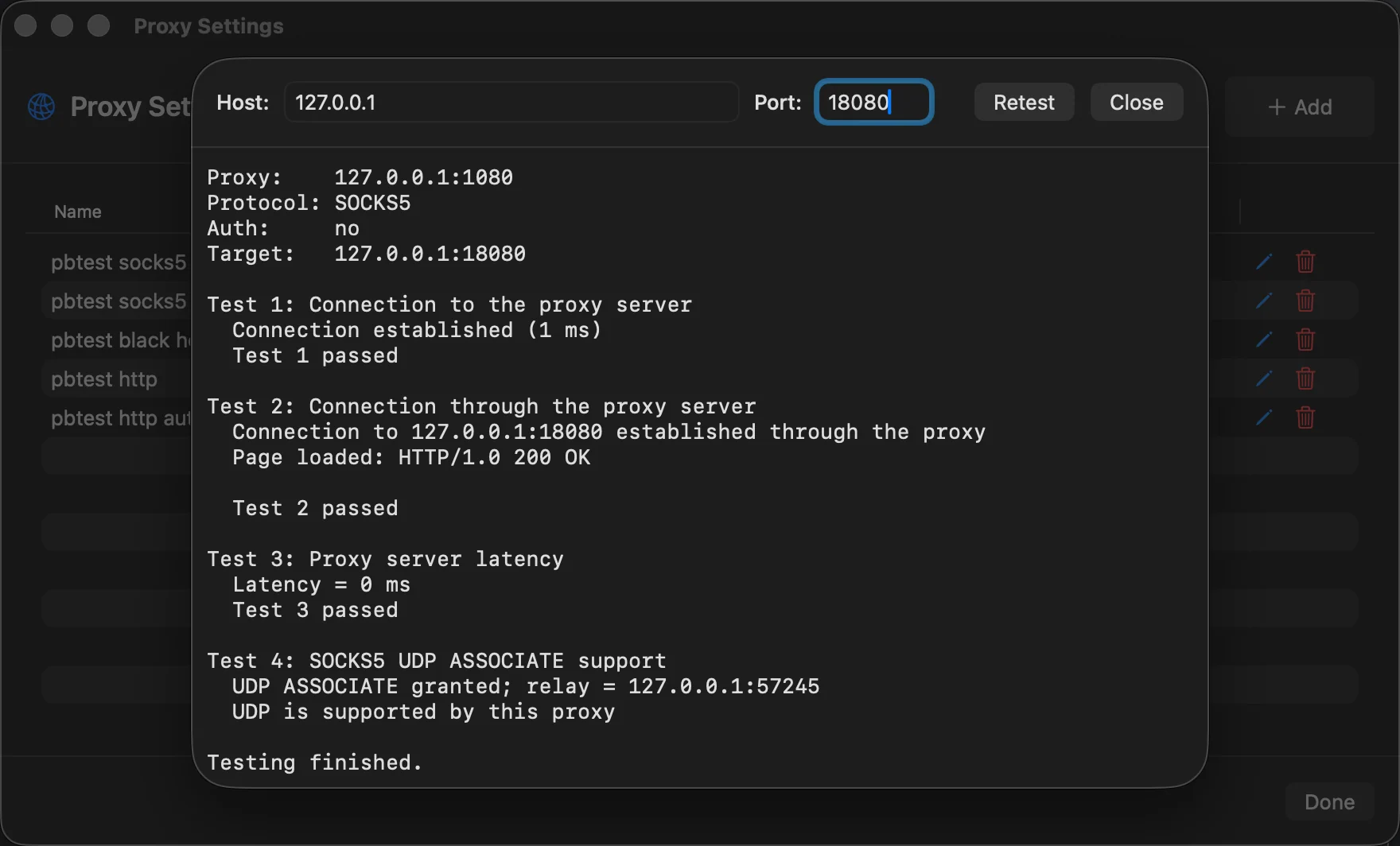
At the top you can change the Host and Port the test connects to through the proxy (default www.google.com and 80) and press Retest. The test is made by ProxyBridge itself, not through your rules, so it tells you whether the proxy works, whatever your rules say.
| Test | What it does |
|---|---|
| Test 1: Connection to the proxy server | Opens a TCP connection to the proxy and shows the connect time |
| Test 2: Connection through the proxy server | Does the SOCKS5 handshake (with authentication if set) or HTTP CONNECT, then asks for the target, then sends a small GET / and shows the first line of the answer, for example Page loaded: HTTP/1.0 200 OK |
| Test 3: Proxy server latency | A second, fresh connection to the proxy and its connect time in ms |
| Test 4: SOCKS5 UDP ASSOCIATE support | SOCKS5 only. Asks the proxy for a UDP relay. Tells you whether the proxy supports UDP |
A run looks like this:
Proxy:    127.0.0.1:1080
Protocol: SOCKS5
Auth:     no
Target:   www.google.com:80

Test 1: Connection to the proxy server
  Connection established (2 ms)
  Test 1 passed

Test 2: Connection through the proxy server
  Connection to www.google.com:80 established through the proxy
  Page loaded: HTTP/1.0 200 OK
  Test 2 passed

Test 3: Proxy server latency
  Latency = 1 ms
  Test 3 passed

Test 4: SOCKS5 UDP ASSOCIATE support
  UDP ASSOCIATE granted; relay = 127.0.0.1:50734
  UDP is supported by this proxy

Testing finished.
What the failures mean:
| Output | Meaning |
|---|---|
Could not connect to the proxy ... Testing finished: proxy is not reachable. |
Nothing is listening on that host and port, a firewall is in the way, or the name does not resolve. The other tests are skipped |
SOCKS5 handshake or auth failed |
Wrong user name or password, or the proxy does not accept the authentication methods ProxyBridge offers |
SOCKS5 CONNECT failed: REP=0x05 (connection refused) |
The proxy works but could not reach the target. The reason in brackets comes from the proxy: general failure, not allowed by ruleset, network unreachable, host unreachable, connection refused, TTL expired, command not supported, address type not supported |
HTTP CONNECT failed: HTTP/1.1 407 ... |
The proxy wants authentication, or rejected yours. Other codes (403, 502...) are the proxy's own answer |
UDP ASSOCIATE rejected: REP=0x07 (command not supported) and UDP is not supported by this proxy |
The proxy handles TCP only. UDP rules that use it will not work |
Test 4 matters only if you plan to send UDP (QUIC, voice, games) through the proxy. A proxy that fails it is still perfectly fine for web traffic over TCP.
Edit or delete a proxy
- Edit (pencil) opens the same window with the current values. Changes apply to new connections. Connections that are already open keep using the old settings until they end.
- Delete (trash) asks Delete Proxy? first. If rules use that proxy, the message says how many (3 rules use this proxy and will be set to Direct). When you confirm, those rules are changed to DIRECT, so nothing silently keeps pointing at a proxy that no longer exists.
Several proxies at once
Add all of them and choose the proxy per rule in the Action list. Typical set-ups:
- Browsers to Burp Suite (
HTTP 127.0.0.1:8080) and a command-line tool to Tor (SOCKS5 127.0.0.1:9050) at the same time. - A corporate proxy for the company network and a personal proxy for everything else.
See Use cases.
There is no "default proxy" on macOS: a rule always names the proxy it uses. When you create a rule, the Action starts on your first proxy (or DIRECT if you have none).
A proxy on the same Mac
Tools such as Burp Suite, mitmproxy, Tor and ssh -D usually run on 127.0.0.1. That works: the ProxyBridge extension makes its own connection to the proxy, and that connection is never redirected again.
One thing to watch: if you route all programs (*) to a local proxy tool, the tool's own outgoing connections can be caught by the same rule and loop back into itself. ProxyBridge only exempts itself, not your proxy tool. Add a DIRECT rule for the proxy tool, or name the programs you want to route instead of using *. See Use cases.
Tips
- Run Test after every change. It takes a second and shows exactly which step fails.
- Give proxies short names. They appear in the rule Action list and in the Connections log.
- Proxy credentials are in the clear in profile files. Use a throw-away account, or remove the password before sharing a profile.
- Port and host are checked when you save, but ProxyBridge cannot know whether something is listening. A proxy that is down shows up as
SOCKS5 connect failedor... greeting write failedentries in the Activity Logs, and the affected connections fail (they do not fall back to direct).
Next
- Proxy rules: decide which traffic goes through which proxy.
- Profiles: save a set of proxies and rules, and switch between them.